Search Impressions, Clicks and CTR Explained with a Simple Example
What is the difference between an impression and a click? A result can be counted in Search Console without someone clicking it.
1:47 · No narration: the video shows each step as text on screen, and every step is written out below, with buttons that jump the video to it.
Prefer YouTube? Watch this video on our YouTube channel (opens in a new tab).
The six points in the video
This is a silent video. The headings, explanations and labels below reproduce the information on screen.
-
Step 1: Impressions count appearances
Search Console applies impression rules to the result being measured.
On-screen labels: Search appearance; Result type; Impression rules.
-
Step 2: Clicks record a selected result
A counted click generally takes the visitor out to the linked page.
On-screen labels: Selected result; Destination page; Recorded click.
-
Step 3: CTR compares clicks and views
Click-through rate is clicks divided by impressions, expressed as a percentage.
On-screen labels: Click count; Impression count; Percentage result.
-
Step 4: Use a simple example
If 20 clicks come from 1,000 impressions, the CTR is 2%.
On-screen labels: 20 clicks; 1,000 impressions; 2% CTR.
-
Step 5: Match the report filters
Use the same dates, search type and other filters for the comparison.
On-screen labels: Same date range; Same search type; Same filters.
-
Step 6: Check what happens afterwards
Search clicks alone do not show whether a visitor made an enquiry.
On-screen labels: Landing page; Useful visitor task; Business outcome.
A practical check for your business
Compare the measures over a relevant period using the same report context. An impression, a click and the resulting ratio describe different parts of search activity and do not by themselves prove a sale.
Sources and further detail
See it in a diagram
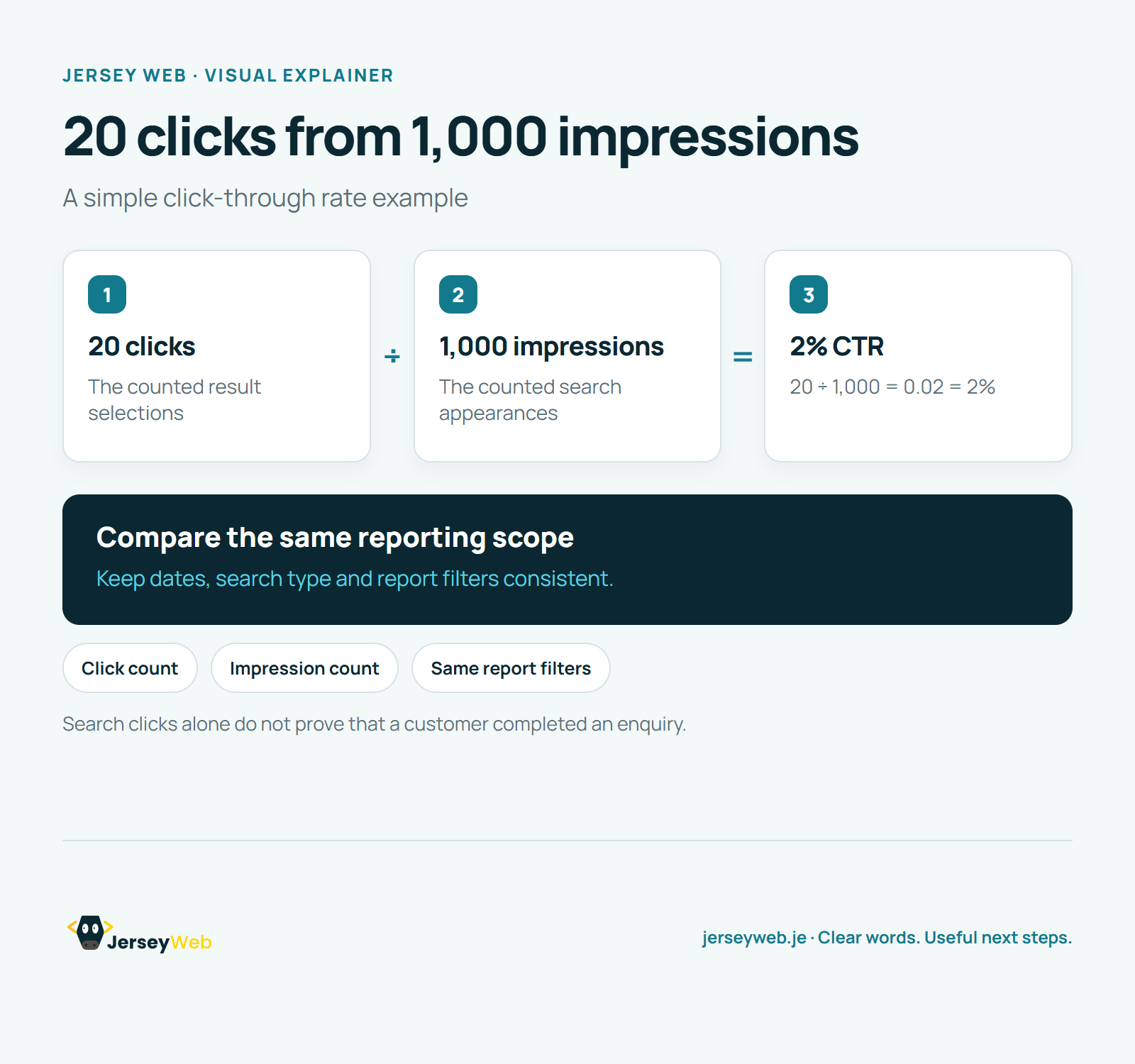
Read the diagram as text
- 20 clicks: The counted result selections
- 1,000 impressions: The counted search appearances
- 2% CTR: 20 ÷ 1,000 = 0.02 = 2%
Compare the same reporting scope. Keep dates, search type and report filters consistent.
Search clicks alone do not prove that a customer completed an enquiry.
Diagram by Jersey Web. Open full size · Source and further detail (opens in a new tab)
Common questions
What is the difference between an impression and a click?
A result can be counted in Search Console without someone clicking it. Use the same report scope when comparing the numbers.
Go further
More video tips
All 205 videos →
Average Search Position Explained: Why One Ranking Number Needs Context
Read search rankings in context.
Organic vs Paid Search: Two Ways a Business Can Appear in Search
Know the search traffic source.