XML Explained: Tagged Information and Agreed Data Formats
Can two XML files use different tag names? XML describes structured information using elements and tags suited to an agreed format.
1:47 · No narration: the video shows each step as text on screen, and every step is written out below, with buttons that jump the video to it.
Prefer YouTube? Watch this video on our YouTube channel (opens in a new tab).
The six points in the video
This is a silent video. The headings, explanations and labels below reproduce the information on screen.
-
Step 1: Recognise the tagged structure
Elements give names and structure to the information in the document.
On-screen labels: Named elements; Opening tags; Closing tags.
-
Step 2: Review the hierarchy
Elements can contain other elements to express a relationship.
On-screen labels: Parent element; Child elements; Related values.
-
Step 3: Agree the expected format
The receiving application needs the element names and layout it understands.
On-screen labels: Expected names; Agreed structure; Application format.
-
Step 4: Keep the document well formed
Check that the XML syntax can be read correctly.
On-screen labels: Matched tags; Correct nesting; Readable document.
-
Step 5: Separate data from presentation
An XML document can describe information without defining its final page design.
On-screen labels: Structured values; Application processing; Separate presentation.
-
Step 6: Test the real exchange
Use representative information and inspect the received result.
On-screen labels: Sample document; Receiving system; Expected records.
A practical check for your business
Ask which XML format the receiving application expects. Review both valid document syntax and the resulting business values; a document that parses can still contain the wrong information.
Sources and further detail
See it in a diagram
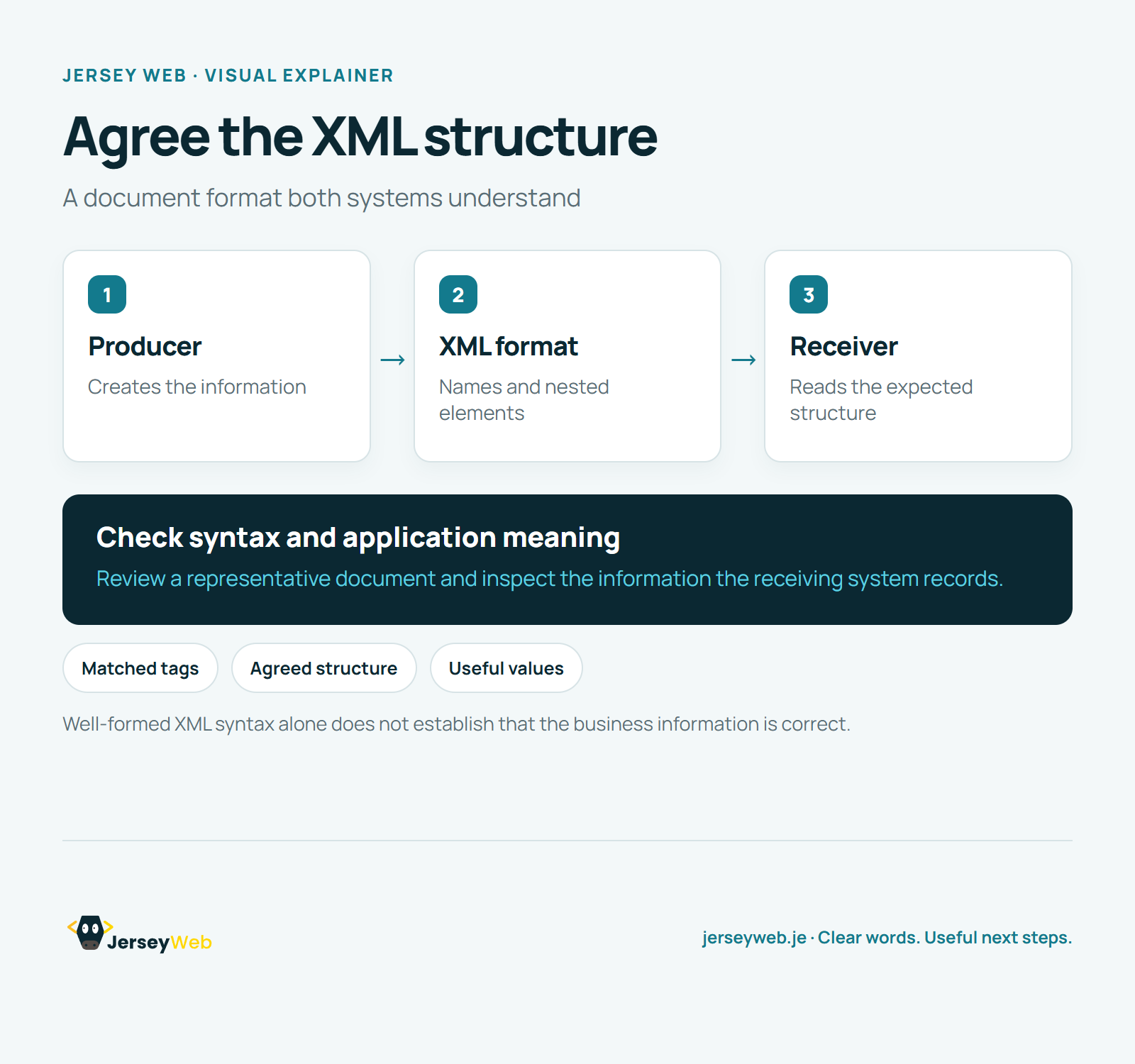
Read the diagram as text
- Producer: Creates the information
- XML format: Names and nested elements
- Receiver: Reads the expected structure
Check syntax and application meaning. Review a representative document and inspect the information the receiving system records.
Well-formed XML syntax alone does not establish that the business information is correct.
Diagram by Jersey Web. Open full size · Source and further detail (opens in a new tab)
Common questions
Can two XML files use different tag names?
XML describes structured information using elements and tags suited to an agreed format. Validate the structure and check how the receiving system uses it.
Go further
More video tips
All 205 videos →
Markdown Explained: Headings, Lists and Links in Plain Text
Markdown, explained.
MIME Types Explained: How a Website Identifies the Content It Sends
MIME types, explained.