CRM Explained: Organise Customer Records, Enquiries and Follow-Up Tasks
Where does a website enquiry go after someone sends it? A CRM can organise customer information, interactions and the next follow-up task.
1:47 · No narration: the video shows each step as text on screen, and every step is written out below, with buttons that jump the video to it.
Prefer YouTube? Watch this video on our YouTube channel (opens in a new tab).
The six points in the video
This is a silent video. The headings, explanations and labels below reproduce the information on screen.
-
Step 1: Keep relevant contact records
A record can hold information about a person the business deals with.
On-screen labels: Contact record; Relevant details; Recognisable customer.
-
Step 2: Connect related information
A CRM can relate contacts, organisations and opportunities.
On-screen labels: Related organisation; Customer enquiry; Relevant opportunity.
-
Step 3: Record useful interactions
Keep appropriate context about the enquiry and its progress.
On-screen labels: Previous conversation; Enquiry context; Current position.
-
Step 4: Assign the next action
A useful process says who should do what next.
On-screen labels: Named owner; Follow-up task; Agreed next step.
-
Step 5: Check the website connection
Confirm the form creates or updates the intended record.
On-screen labels: Submitted enquiry; Correct record; Useful confirmation.
-
Step 6: Review access and accuracy
Give people appropriate access and keep the information useful.
On-screen labels: Suitable access; Accurate information; Maintained process.
A practical check for your business
Follow a safe sample enquiry into the customer system and assign the next action. Confirm that the record is recognisable, the responsible person can access it and the follow-up task remains clear.
Sources and further detail
See it in a diagram
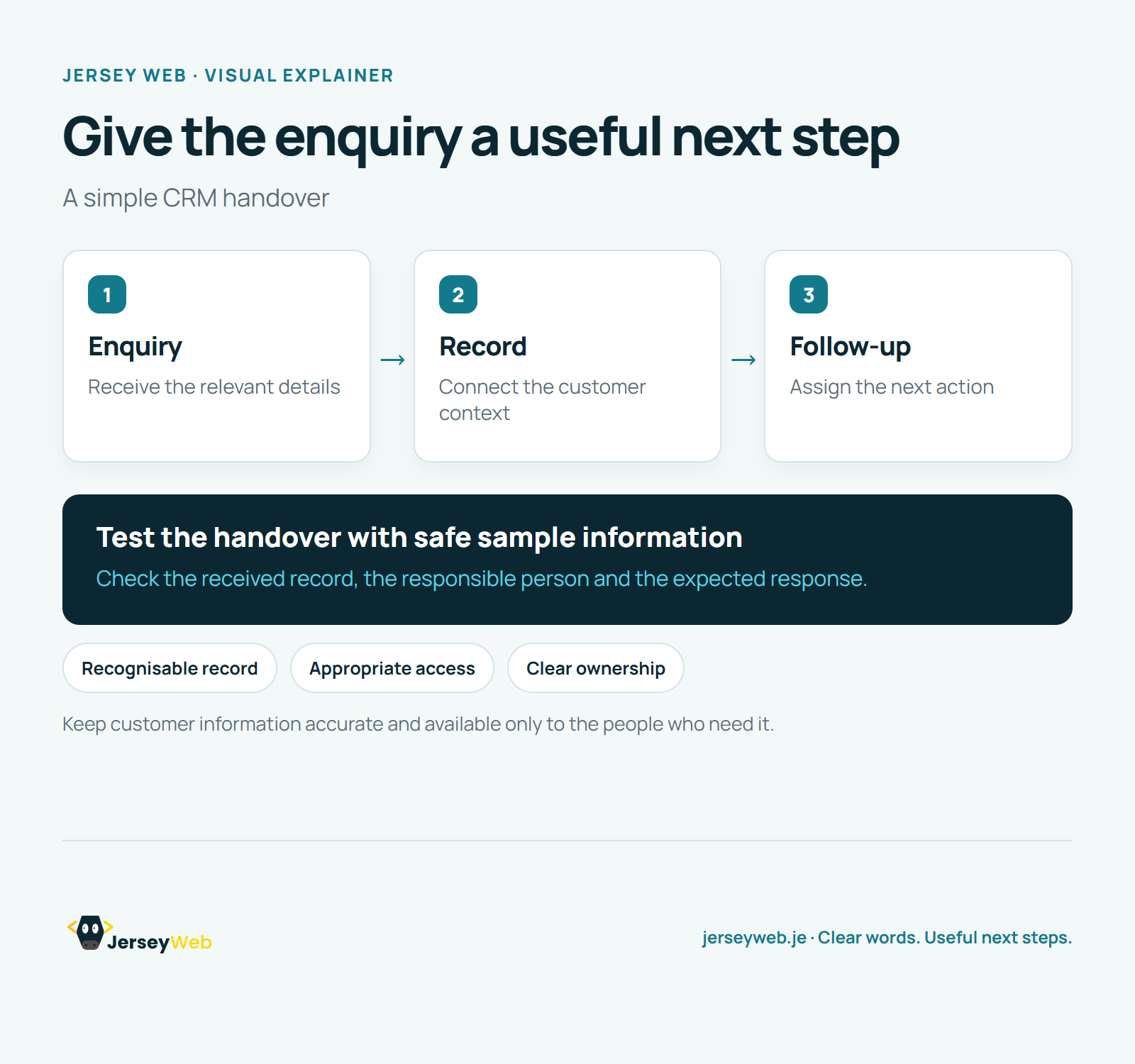
Read the diagram as text
- Enquiry: Receive the relevant details
- Record: Connect the customer context
- Follow-up: Assign the next action
Test the handover with safe sample information. Check the received record, the responsible person and the expected response.
Keep customer information accurate and available only to the people who need it.
Diagram by Jersey Web. Open full size · Source and further detail (opens in a new tab)
Common questions
Where does a website enquiry go after someone sends it?
A CRM can organise customer information, interactions and the next follow-up task. Test the enquiry handover and make ownership of the next action clear.
Go further
More video tips
All 205 videos →
API Endpoints Explained: Where a Software Request Is Sent
API endpoints, explained.
API Rate Limiting Explained: What a 429 Response Means
Rate limiting, explained.