Website Input Validation Explained: Browser Checks and Server Checks
Does a browser form check make submitted information safe to use? The server also needs to validate incoming information before processing it.
1:47 · No narration: the video shows each step as text on screen, and every step is written out below, with buttons that jump the video to it.
Prefer YouTube? Watch this video on our YouTube channel (opens in a new tab).
The six points in the video
This is a silent video. The headings, explanations and labels below reproduce the information on screen.
-
Step 1: Define the accepted values
Decide which types, ranges and formats the task actually permits.
On-screen labels: Expected type; Allowed range; Required information.
-
Step 2: Help the visitor early
Browser checks can identify common mistakes before submission.
On-screen labels: Useful form feedback; Recognisable issue; Clear correction.
-
Step 3: Validate on the server too
A request can reach the server without following the normal form interface.
On-screen labels: Incoming request; Server validation; Processing decision.
-
Step 4: Check important constraints
Review values such as allowed options, lengths and numeric ranges.
On-screen labels: Allowed option; Suitable length; Valid number range.
-
Step 5: Handle invalid input clearly
Return useful feedback without pretending the task succeeded.
On-screen labels: Rejected value; Helpful response; Accurate task status.
-
Step 6: Use layered protection
Input validation is one part of protecting an application.
On-screen labels: Validated information; Other security controls; Reviewed implementation.
A practical check for your business
Try allowed and unsuitable values through the actual submission route. Review browser feedback, server handling and the resulting task status rather than relying on the appearance of the form alone.
Sources and further detail
See it in a diagram
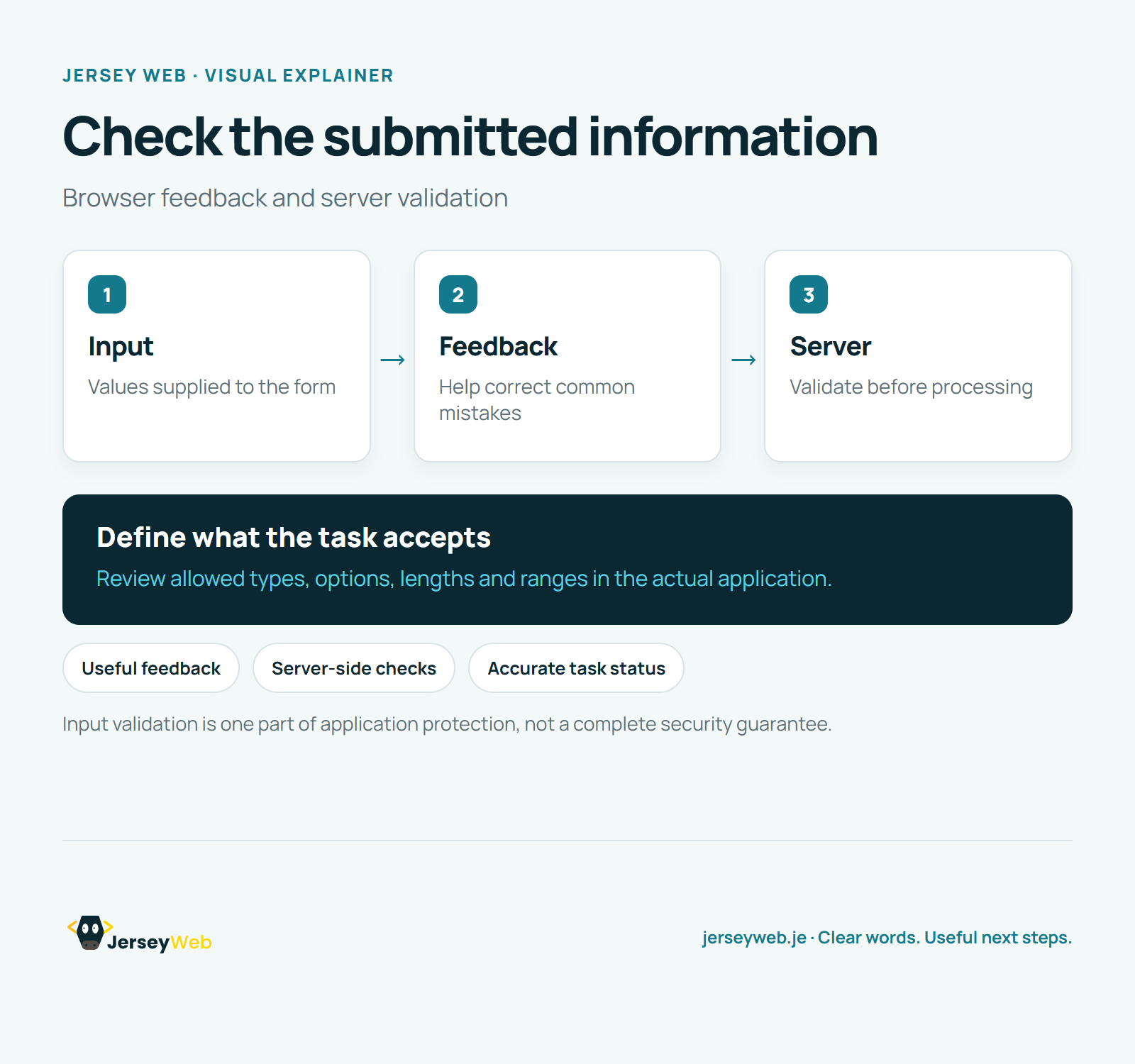
Read the diagram as text
- Input: Values supplied to the form
- Feedback: Help correct common mistakes
- Server: Validate before processing
Define what the task accepts. Review allowed types, options, lengths and ranges in the actual application.
Input validation is one part of application protection, not a complete security guarantee.
Diagram by Jersey Web. Open full size · Source and further detail (opens in a new tab)
Common questions
Does a browser form check make submitted information safe to use?
The server also needs to validate incoming information before processing it. Test the actual submitted values and the server response.
Go further
More video tips
All 205 videos →
Shopping Carts Explained: Items, Quantities and the Route to Checkout
Shopping carts, explained.
Online Checkout Explained: Review the Complete Customer Order Journey
Online checkout, explained.