Shopping Carts Explained: Items, Quantities and the Route to Checkout
What should happen after someone adds a product to a basket? A shopping cart holds the selected items and quantities before the customer completes checkout.
1:47 · No narration: the video shows each step as text on screen, and every step is written out below, with buttons that jump the video to it.
Prefer YouTube? Watch this video on our YouTube channel (opens in a new tab).
The six points in the video
This is a silent video. The headings, explanations and labels below reproduce the information on screen.
-
Step 1: Check the selected item
The basket should identify the product and option the customer chose.
On-screen labels: Correct product; Selected variant; Recognisable item.
-
Step 2: Review the quantity
Make it clear how many of each item the customer intends to buy.
On-screen labels: Item quantity; Useful controls; Accurate update.
-
Step 3: Explain the item amounts
Show amounts that relate to the actual selections.
On-screen labels: Relevant unit amount; Line amount; Clear currency.
-
Step 4: Test changing the basket
Try removing an item and adjusting an allowed quantity.
On-screen labels: Remove an item; Change quantity; Updated result.
-
Step 5: Review an unavailable item
Help the customer understand an item that cannot be added or purchased.
On-screen labels: Unavailable choice; Helpful message; Useful next step.
-
Step 6: Check the checkout route
The next stage should use the basket the customer reviewed.
On-screen labels: Current selection; Working next step; Consistent checkout.
A practical check for your business
Change a representative basket before continuing to checkout. Confirm that product options, quantities and amounts still match the intended selection and that an unavailable item receives useful feedback.
Sources and further detail
See it in a diagram
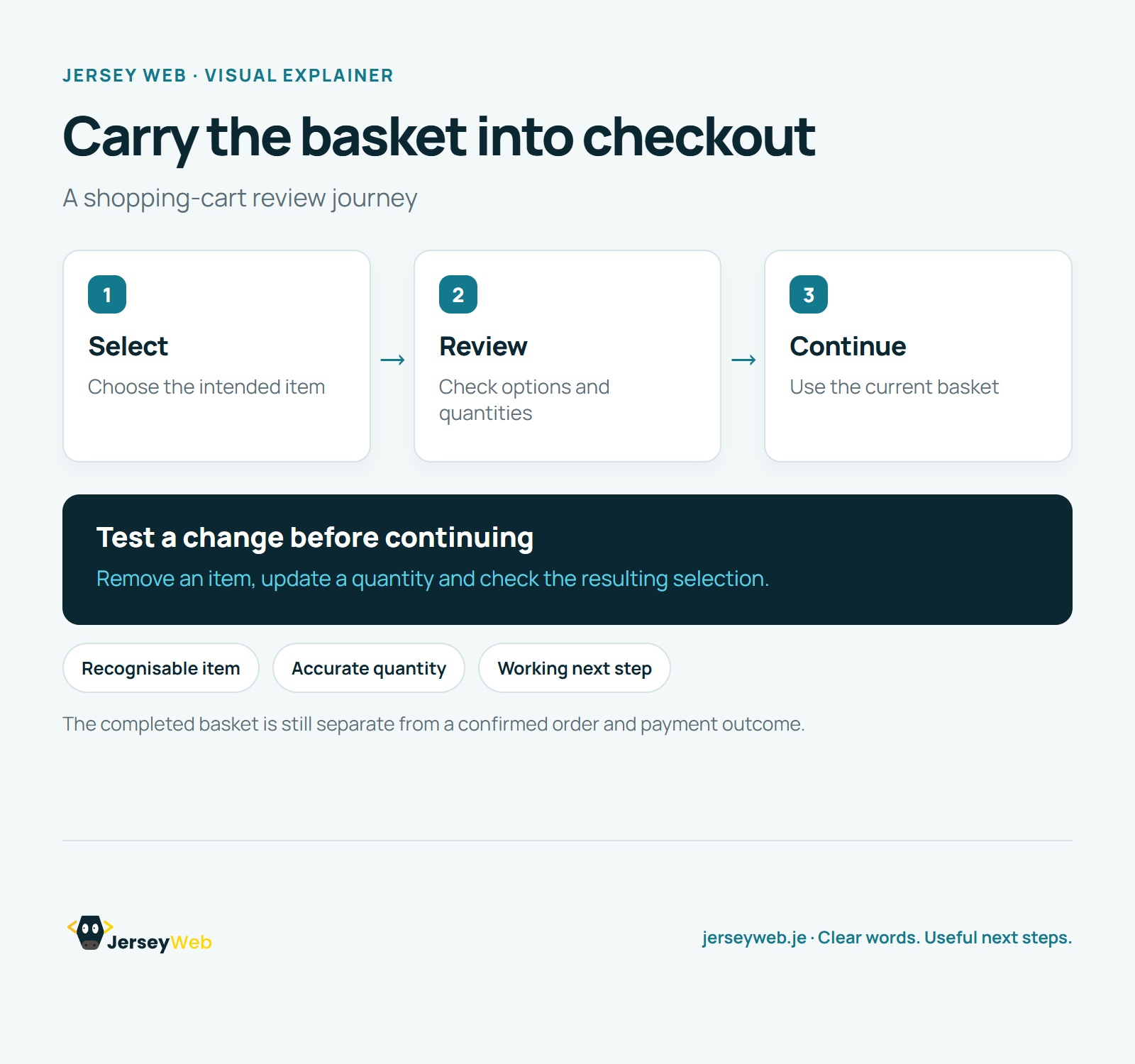
Read the diagram as text
- Select: Choose the intended item
- Review: Check options and quantities
- Continue: Use the current basket
Test a change before continuing. Remove an item, update a quantity and check the resulting selection.
The completed basket is still separate from a confirmed order and payment outcome.
Diagram by Jersey Web. Open full size · Source and further detail (opens in a new tab)
Common questions
What should happen after someone adds a product to a basket?
A shopping cart holds the selected items and quantities before the customer completes checkout. Test changes to the basket before continuing to checkout.
Go further
More video tips
All 205 videos →
Online Checkout Explained: Review the Complete Customer Order Journey
Online checkout, explained.
Payment Gateways Explained: The Connection Between Checkout and Payment Processing
Payment gateways, explained.