Watch a related explainer
In plain English
HTTPS is the secure form of HTTP, using TLS to protect the connection. It helps keep information private while travelling between the browser and server, protects the integrity of that communication and supports authentication of the server connection. It is part of the website’s technical delivery arrangement.
MDN’s HTTPS definition describes HTTP with transport protection. Its explanation of TLS discusses the properties the protocol supplies. The details of a working deployment include certificates and configuration, which need appropriate ongoing maintenance.
HTTPS protects a connection; it does not verify every claim on the page. It also does not establish how a business handles information after receipt. A genuine business website therefore needs clear service information, appropriate application controls and sensible account access alongside its transport protection.
Why it matters for a Jersey business
Customers may send an enquiry or use a booking service through the website. The connection should work without certificate warnings or unexpected insecure resources. The owner should know which provider maintains that protection and whom to contact if visitors report a warning or a feature stops loading.
The business also needs to understand the limits. An HTTPS address does not establish that every staff account is protected or that every stored record has appropriate access rules. Review transport, application, accounts and information handling as related parts of the service, each with its own responsible maintainer.
A realistic Jersey example
Imagine a Jersey consultancy moving its website to a new host. This is a hypothetical example. The team checks the intended domain and relevant hostnames, confirms the certificate arrangement and reviews the final forms and embedded resources. It tests the site’s ordinary public URLs after the switch.
An old image reference still points to an insecure address, so the maintainer updates it and verifies the delivered resource. The owner records certificate responsibility and the support route in the handover. The review establishes the intended website configuration without claiming that a certificate proves the business’s wider security.
What to check in the website handover
Confirm the intended addresses. List the domain names and hostnames the website actually uses, including any supported alternative that redirects to the main address. Ask the maintainer to verify the certificate and delivery configuration for those routes. A working preview address does not establish the final business domain’s behaviour.
Agree certificate responsibility. Record whether the hosting service manages issuance and renewal and who checks failures. Follow the actual provider’s supported process. A previous certificate being valid during development does not remove the need to maintain the live arrangement as hosts or domains change.
Review resource requests. Check that scripts, images, styles and embedded features use appropriate supported connections. MDN’s mixed-content guidance explains issues when secure pages request insecure resources. A page can appear partly correct while an affected feature is blocked or handled differently by the browser.
Test the customer’s task. Review enquiry submission, confirmation and any connected service as a complete journey. The initial page loading successfully is one check, while form processing is another. Keep useful diagnostics available to the maintainer without exposing credentials or unnecessary customer information to visitors.
Handle warnings appropriately. Staff should know where to report a certificate or connection warning rather than instruct customers to disregard it. Capture suitable non-sensitive details about the address and behaviour. The maintainer can then investigate the configuration, certificate and actual network path involved.
Keep the wider controls clear. Transport protection does not replace suitable account permissions, supported sign-in protection or updates to application components. Record those responsibilities separately in the handover. The business should be able to identify which arrangement protects travelling information and which controls protect access to the service.
Check after material changes. A host move, domain change or new embedded feature can affect delivery. Include HTTPS and relevant resource checks in the release review. Preserve an understandable record of the configuration and support owner so that later maintenance is based on evidence rather than assumptions about an old setup.
Common myths
HTTPS proves every website claim is true. It concerns the connection’s protection.
A secure page address covers every resource automatically. Inspect the requests the page actually makes.
Certificates need no maintenance after launch. Agree the ongoing provider and review process.
Our take
Jersey Web’s view is to verify HTTPS on the real business addresses and complete customer tasks, then document ongoing responsibility. Keep its role clear within the wider security arrangement. The owner should know what is configured and how to get a connection problem investigated.
See it in a diagram
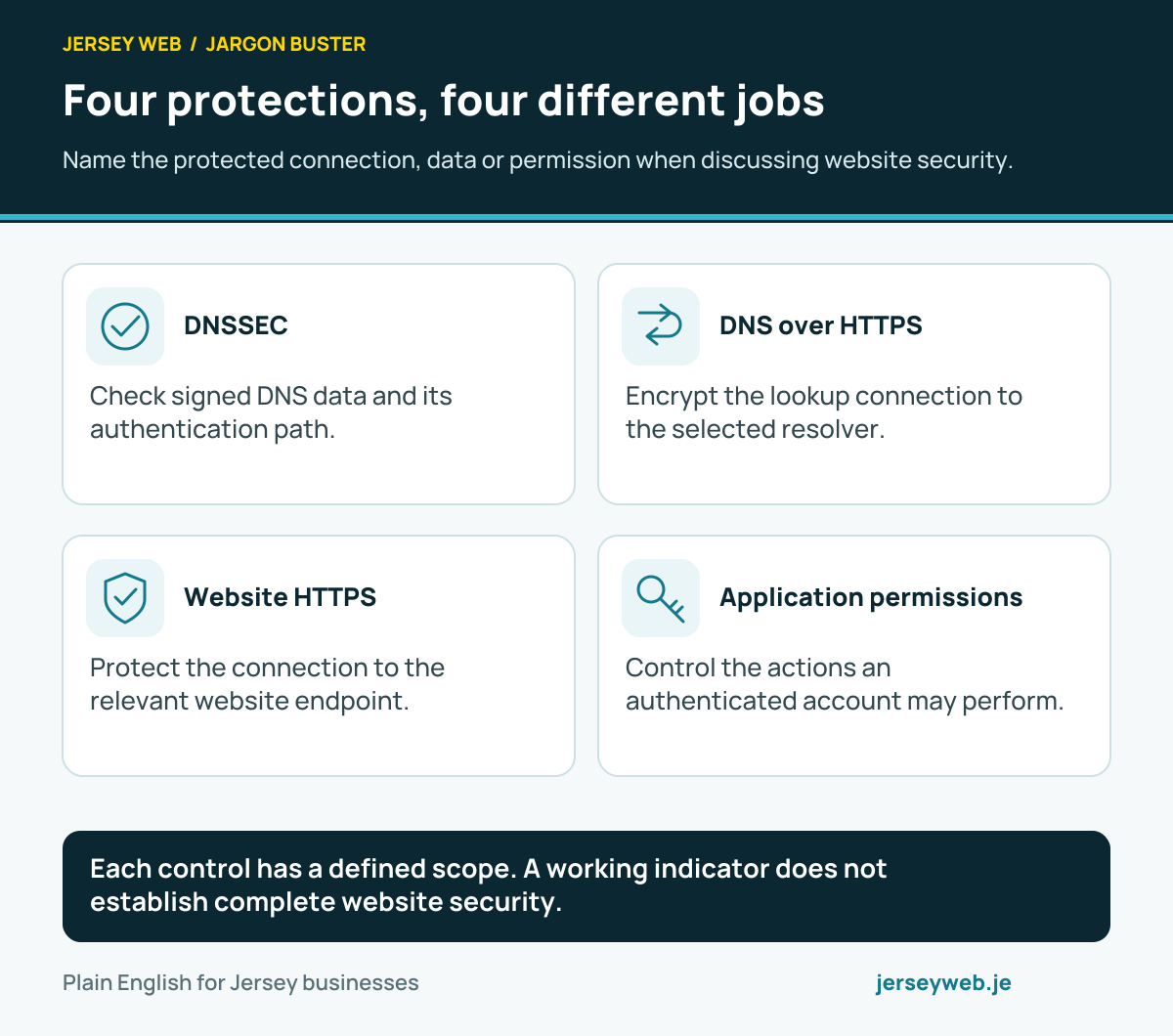
Each control has a defined scope. A working indicator does not establish complete website security.
Read the diagram in text
- DNSSEC. Check signed DNS data and its authentication path.
- DNS over HTTPS. Encrypt the lookup connection to the selected resolver.
- Website HTTPS. Protect the connection to the relevant website endpoint.
- Application permissions. Control the actions an authenticated account may perform.
Related terms
Learn more
Common questions
- Does HTTPS prove a website is trustworthy?
- No. It protects aspects of the connection. A misleading business or fraudulent page can also use HTTPS, so verify the organisation and intended address.
- Is HTTPS the same as encryption of stored records?
- No. Transport protection concerns information travelling over the connection. Stored records, account access and application behaviour need their own appropriate controls.
- Why can an HTTPS page still have a resource problem?
- It may request a resource through an insecure connection or have another configuration fault. Review the actual requests and browser messages rather than assuming the page address covers every resource.
- Who should maintain the certificate?
- Agree responsibility with the host or website maintainer. Confirm the supported renewal arrangement, covered hostnames and how failures are detected and resolved.
Written by Jersey Web. Last reviewed 5 October 2026. Back to the Jargon Buster.