Watch a related explainer
In plain English
A product feed passes structured catalogue information to a receiving service. Google’s product-data specification is one example of a destination defining the fields it expects. Other services have their own requirements, so a file prepared for one destination should not be assumed suitable for all of them.
The feed needs an understandable connection to the shop’s actual offers. Ask which system owns the information, how it is exported and what the receiver has processed. Those observations help staff distinguish a corrected product record from a change that has reached the destination.
Why it matters for a Jersey business
An online shop may sell products through more than one customer-facing channel. If a product’s details change, staff need to understand how that change reaches each relevant service. The website, exported data and destination record should be reviewed together when a customer reports a contradictory offer.
Before promising a shopping integration, ask the maintainer to confirm support for the actual account, products and intended markets. Keep that review tied to the receiving service’s current requirements. A feed file by itself does not establish that a particular destination will display the shop’s products.
A realistic Jersey example
Imagine a Jersey homewares shop preparing approved catalogue data for a supported merchant service. This is a hypothetical example. The owner identifies each sellable variant and records the appropriate product information in the shop’s maintained source system.
The review follows a changed availability value from the source through the submitted data to the destination record. Staff check the matching product page and inspect any processing issue. They do not describe an accepted upload as a completed visibility check. The test records the separate stages and the person responsible for correcting a mismatch.
Practical checks for a product feed
Name the destination and input method. Google’s data-source guide describes supported ways to supply product information to Merchant Center. Ask the maintainer to document the actual configured method, its owner and its update process. Avoid leaving staff to guess which export or connector is responsible for the live record.
Map identifiers carefully. Distinguish the shop’s SKU, an individual destination product ID, a variant group and any manufacturer-assigned identifiers. Ask the maintainer to show the mapping for an actual representative product. Keep the source reference alongside the relevant variant so an update does not accidentally describe a different item.
Review customer-visible consistency. Compare the submitted title, image, price and availability with the relevant offer page. Check the variant selection as well as the general product name. A broadly correct description can still lead to an unsuitable result if the destination image or availability refers to another variant.
Verify changes and removal. Use a controlled product update to check how the integration sends changed information and how the destination reports processing. Agree how staff handle discontinued items and temporary changes through the supported system. A saved source record and an updated destination are separate observations worth recording.
Review website markup where relevant. Google’s structured-data guidance explains supported uses of product annotations in Merchant Center. Have the maintainer check the actual markup and data-source arrangement. The business should understand which information the receiver uses, rather than assume that enabling a plugin establishes a complete catalogue integration.
Use diagnostics for the actual item. Record the product reference, affected destination and reported issue when requesting help. Inspect the relevant requirement before correcting a field. Keep the fix in the maintained source or mapping where appropriate, then verify the processed result so the next update does not silently restore the earlier mistake.
Common myths and mistakes
Sending data is not proof of approval, advertising or customer visibility. Check those stages separately in the intended service. Avoid promising a ranking or a particular presentation merely because the catalogue file has the expected columns.
Another mistake is maintaining conflicting values in several places without ownership. Define which source controls each important field and how corrections flow through the integration. Staff should know where to make an authorised change and how to verify it.
Our take
Treat the feed as a maintained connection between catalogue information and a destination. Document field ownership, test representative variants and inspect the processed records. That gives the shop a practical way to manage updates without confusing a submitted file with a finished customer outcome.
See it in a diagram
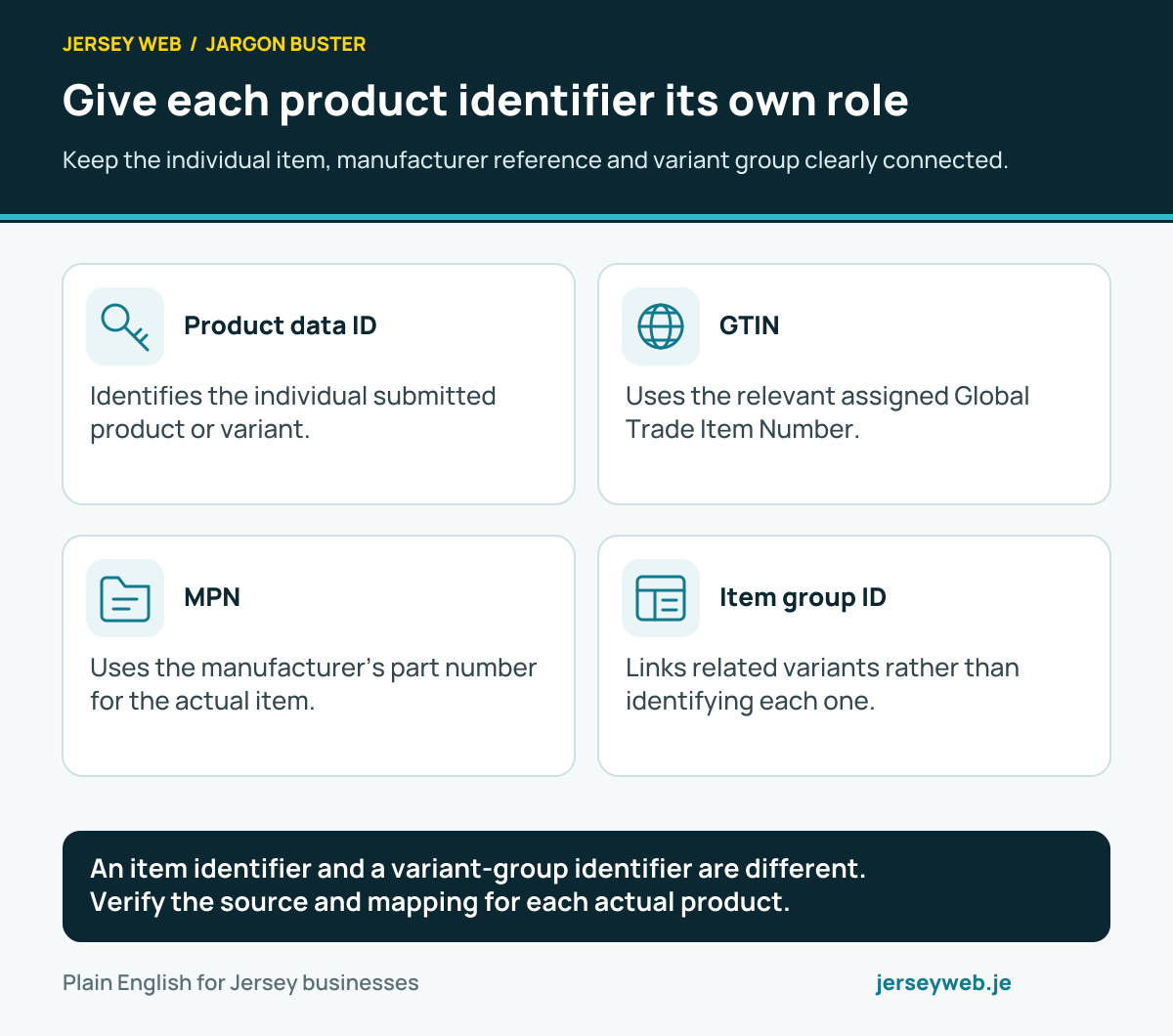
An item identifier and a variant-group identifier are different. Verify the source and mapping for each actual product.
Read the diagram in text
- Product data ID. Identifies the individual submitted product or variant.
- GTIN. Uses the relevant assigned Global Trade Item Number.
- MPN. Uses the manufacturer’s part number for the actual item.
- Item group ID. Links related variants rather than identifying each one.
Related terms
Learn more
Common questions
- Is a product feed the same as a product webpage?
- No. The feed supplies structured product information to a destination. The webpage presents the offer to a visitor, and the two should remain consistent.
- Does a successful upload guarantee approval?
- No. Processing, product eligibility and customer visibility are separate checks. Review the actual destination’s diagnostics and requirements.
- Can structured data help maintain product information?
- Google documents uses for appropriate website structured data in Merchant Center. Review the supported method and the actual source configuration rather than assume that markup replaces every feed requirement.
- Who should maintain feed information?
- Name an owner for the product data and a maintainer for the integration. Define how changed prices, availability, variants and removed items reach the destination.
Written by Jersey Web. Last reviewed 4 October 2026. Back to the Jargon Buster.