Product Data Feeds Explained: Keep Shopping Listings and Website Details Consistent
How can a shopping service learn about the products on your website? A product data feed supplies structured item information to a connected shopping service.
1:47 · No narration: the video shows each step as text on screen, and every step is written out below, with buttons that jump the video to it.
Prefer YouTube? Watch this video on our YouTube channel (opens in a new tab).
The six points in the video
This is a silent video. The headings, explanations and labels below reproduce the information on screen.
-
Step 1: Identify each product clearly
Use the identifiers required by the receiving service.
On-screen labels: Product identifier; Recognisable item; Required values.
-
Step 2: Describe the actual item
The title and description should represent the product being offered.
On-screen labels: Accurate title; Relevant description; Specific product.
-
Step 4: Keep price and stock current
The submitted values should match the relevant website offer.
On-screen labels: Current price; Clear currency; Accurate availability.
-
Step 5: Review the product image
Use an image that represents the item and meets the service requirements.
On-screen labels: Correct item; Suitable image; Current requirements.
-
Step 6: Inspect receiving-service feedback
Fix missing or unsuitable information reported by the service.
On-screen labels: Processing feedback; Reported issue; Verified correction.
A practical check for your business
Compare a submitted product record with its website destination and the receiving service feedback. Keep the exact option, amount and availability consistent when the underlying offer changes.
Sources and further detail
See it in a diagram
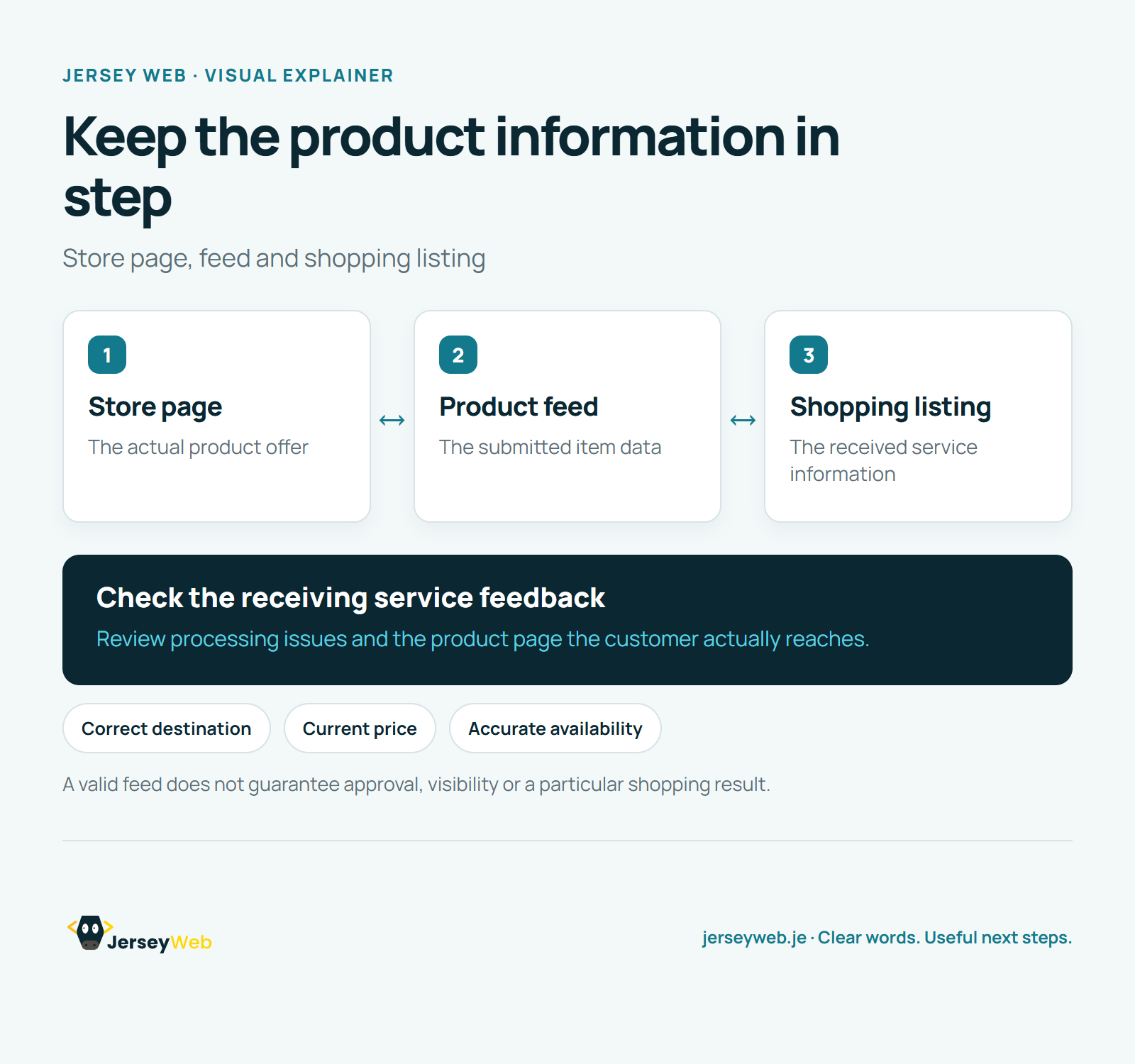
Read the diagram as text
- Store page: The actual product offer
- Product feed: The submitted item data
- Shopping listing: The received service information
Check the receiving service feedback. Review processing issues and the product page the customer actually reaches.
A valid feed does not guarantee approval, visibility or a particular shopping result.
Diagram by Jersey Web. Open full size · Source and further detail (opens in a new tab)
Common questions
How can a shopping service learn about the products on your website?
A product data feed supplies structured item information to a connected shopping service. Review the receiving service diagnostics and the product page a customer reaches.
Go further
More video tips
All 205 videos →
Google Business Profile Ownership: Check Who Controls Your Business Listing
Google Business Profile ownership.
Google Business Profile Categories: Describe What Your Business Actually Does
Google Business categories.