Watch a related explainer
In plain English
A product variant is a particular version of a product that a customer can order. A jumper might be offered by size and colour. “Medium, navy” identifies one version, while “Small, navy” identifies another. The underlying product groups the range; the variant identifies the selected combination that staff need to supply.
The variant documentation illustrates this relationship in an online-shop platform. An option is a dimension of choice, such as size. Its values are the available selections. Combining the relevant values creates a sellable version. The business decides which combinations exist, while the chosen system determines how they are represented and selected.
Some differences belong elsewhere. A customer’s handwritten gift message may be a preparation instruction rather than a separately stocked version. A bundle contains multiple products or components. Review what changes in price, stock and preparation before deciding how to represent an offer. Similar-looking dropdowns can support quite different business processes.
Why it matters for a Jersey business
Variants affect both the customer’s decision and the shop’s work. A person needs understandable choices and accurate availability. Staff need enough detail to select the right item. If only a general product name reaches the order view, the team may have to contact the customer or guess which version was intended.
Prices and images also need to follow the relevant selection. Where versions differ, review the information the customer sees before committing to the order. A shared photograph can be useful, but it should not imply that an unavailable colour is the selected item. Keep the product description, controls and final order summary consistent.
A realistic Jersey example
Imagine a Jersey retailer selling a mug in navy and white, with two capacities. This is a hypothetical example. The shop offers three actual combinations because the larger white mug is not part of the range. The product interface makes those choices understandable instead of presenting every theoretical combination as an available item.
The team reviews the smaller navy mug from selection through to the staff’s received order. Its description, identifier and quantity stay aligned. They also check the unavailable combination and an item whose stock is depleted. These scenarios answer different questions: whether the catalogue offers the combination, and whether an offered version is currently available under the shop’s stock rules.
Practical catalogue checks
Write down the real combinations. Begin with the supplier and business range rather than multiplying dropdown values mechanically. Identify which combinations are supplied, how customers distinguish them and any differences in price or preparation. Keep the list understandable enough for the person who will maintain it when products change.
Map the identifiers. SKU guidance describes internal item references. Give separately handled versions an unambiguous mapping and review the readable description alongside it. Check what appears in exports and staff order views. A correct code hidden in administration is less useful if the person preparing an order cannot identify the item.
Review stock at the right level. Inventory tracking documentation addresses the relevant tracking configuration. Confirm which variant and location the website uses when showing availability. Include connected shop sales where applicable. A quantity for the overall range should not be mistaken for the quantity of a specific size and colour.
Inspect selection behaviour. Change one option after choosing another and check what happens. Does the interface retain a valid combination, explain an unavailable one or silently switch the item? Review the displayed price, image and descriptive text. Controls should have clear labels and usable interaction; the shopper needs to know which version will enter the basket.
Follow the choice through the order. Check the basket summary, checkout and received staff record. Include more than one variant of the same base product in a test basket if that is a realistic customer task. Verify quantity changes and removal independently. This exposes problems that a single product-page screenshot cannot establish.
Handle different offer types deliberately. Bundle documentation explains grouping products into an offer. A bundle’s component stock relationships require their own review. For personalisation, verify how the instruction is retained and presented to staff. Record any exceptions so later catalogue maintenance does not accidentally change the intended preparation process.
Common myths
Every option combination is not automatically a product the business sells. A variant also does not have to be a separate customer-facing page. The chosen platform and catalogue structure determine presentation. Finally, an option control alone does not prove the right identifier and stock quantity reach the order; review the actual result.
Our take
Organise variants around the versions customers choose and staff supply. Make their differences clear, preserve their identifiers and verify the complete ordering journey. Maintain a concise record of the actual combinations so adding a new colour or size does not introduce an impossible selection or ambiguous stock mapping.
See it in a diagram
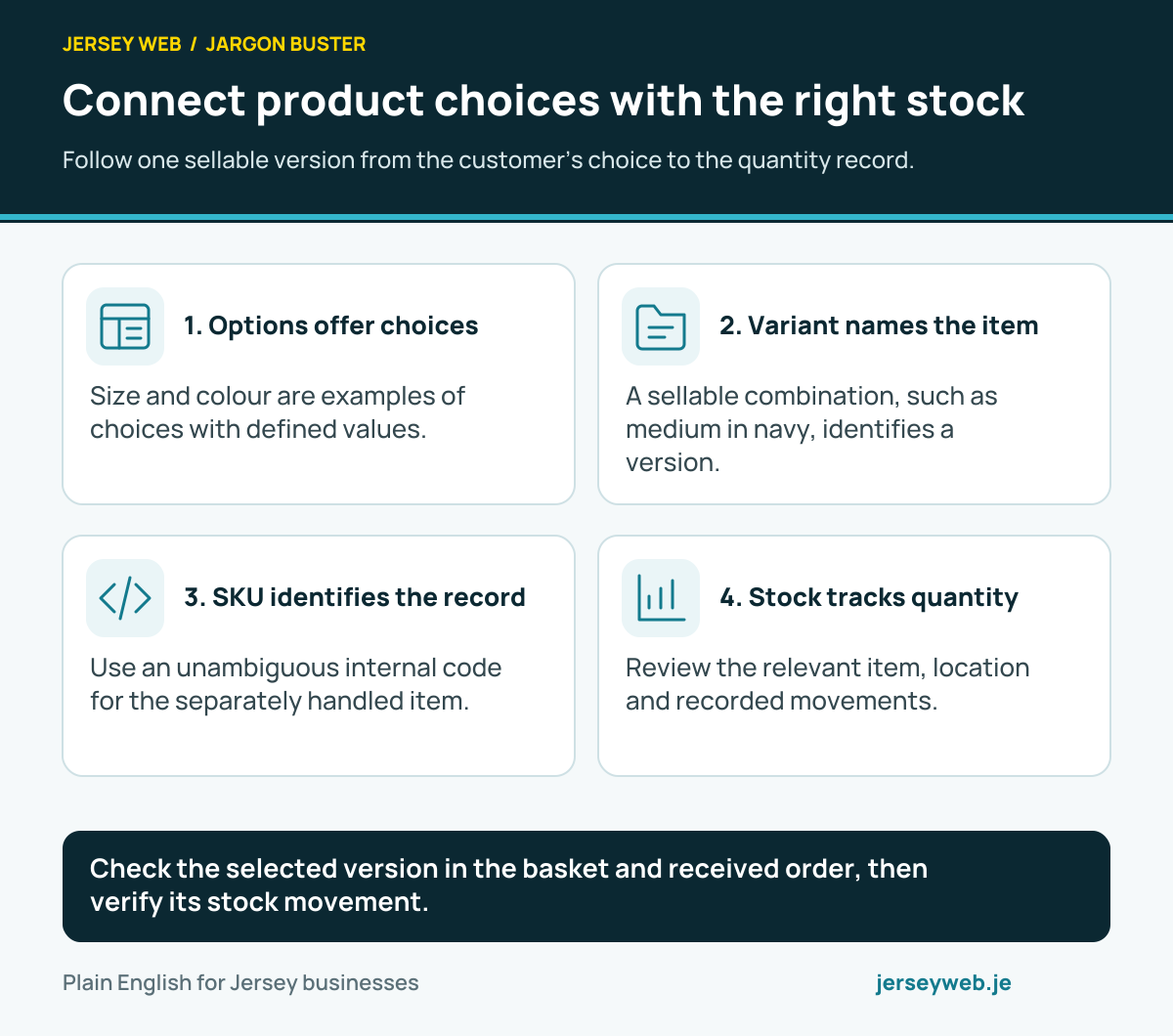
Check the selected version in the basket and received order, then verify its stock movement.
Read the diagram in text
- Options offer choices. Size and colour are examples of choices with defined values.
- Variant names the item. A sellable combination, such as medium in navy, identifies a version.
- SKU identifies the record. Use an unambiguous internal code for the separately handled item.
- Stock tracks quantity. Review the relevant item, location and recorded movements.
Related terms
Learn more
Common questions
- Is a product option the same as a variant?
- No. An option is a choice such as colour, and an option value is a particular colour. A variant is the sellable version formed from the relevant values, such as navy in medium size.
- Does every possible option combination need to be sold?
- No. The business should publish the combinations it actually offers. Review how unavailable combinations appear and ensure the customer cannot unknowingly order a version that the shop does not supply.
- Can variants have different stock quantities?
- Yes, platforms can track separate quantities for stocked variants. The actual result depends on the tracking settings, locations and connected sales arrangements. Review the relevant records rather than infer quantities from the parent product.
- Is a personalised message always a product variant?
- No. A personalisation instruction may be captured separately from the stocked item. Decide how the business prepares and charges for it, then choose a product configuration that preserves the instruction and the intended stock mapping.
Written by Jersey Web. Last reviewed 3 October 2026. Back to the Jargon Buster.