What Is a CDN? Website Content Delivery Explained
What does a CDN do for a website? It can bring saved files closer to your visitors.
1:47 · No narration: the video shows each step as text on screen, and every step is written out below, with buttons that jump the video to it.
Prefer YouTube? Watch this video on our YouTube channel (opens in a new tab).
The six points in the video
This is a silent video. The headings, explanations and labels below reproduce the information on screen.
-
Step 1: Start at the origin
Your website has a main source for pages and files.
On-screen labels: Website hosting; Original files; Origin server.
-
Step 2: Add a network of servers
A CDN distributes delivery across different locations.
On-screen labels: Multiple locations; Visitor requests; Nearby delivery.
-
Step 3: Reuse suitable content
Images and other public files can be cached for reuse.
On-screen labels: Public images; Styles and scripts; Cached copies.
-
Step 4: Keep hosting in the plan
A CDN still needs access to the original content.
On-screen labels: Origin connection; Hosting service; Delivery network.
-
Step 5: Plan how updates appear
Cache settings affect when visitors receive new files.
On-screen labels: Expiry rules; Cache refresh; Updated content.
-
Step 6: Measure the actual result
Check important pages before and after enabling it.
On-screen labels: Loading experience; Correct content; Working forms.
A practical check for your business
Keep a note of the origin host, delivery provider and person responsible for each. When troubleshooting, compare the delivered file with the intended origin version. A delivery network still needs suitable caching rules and a working origin.
Sources and further detail
See it in a diagram
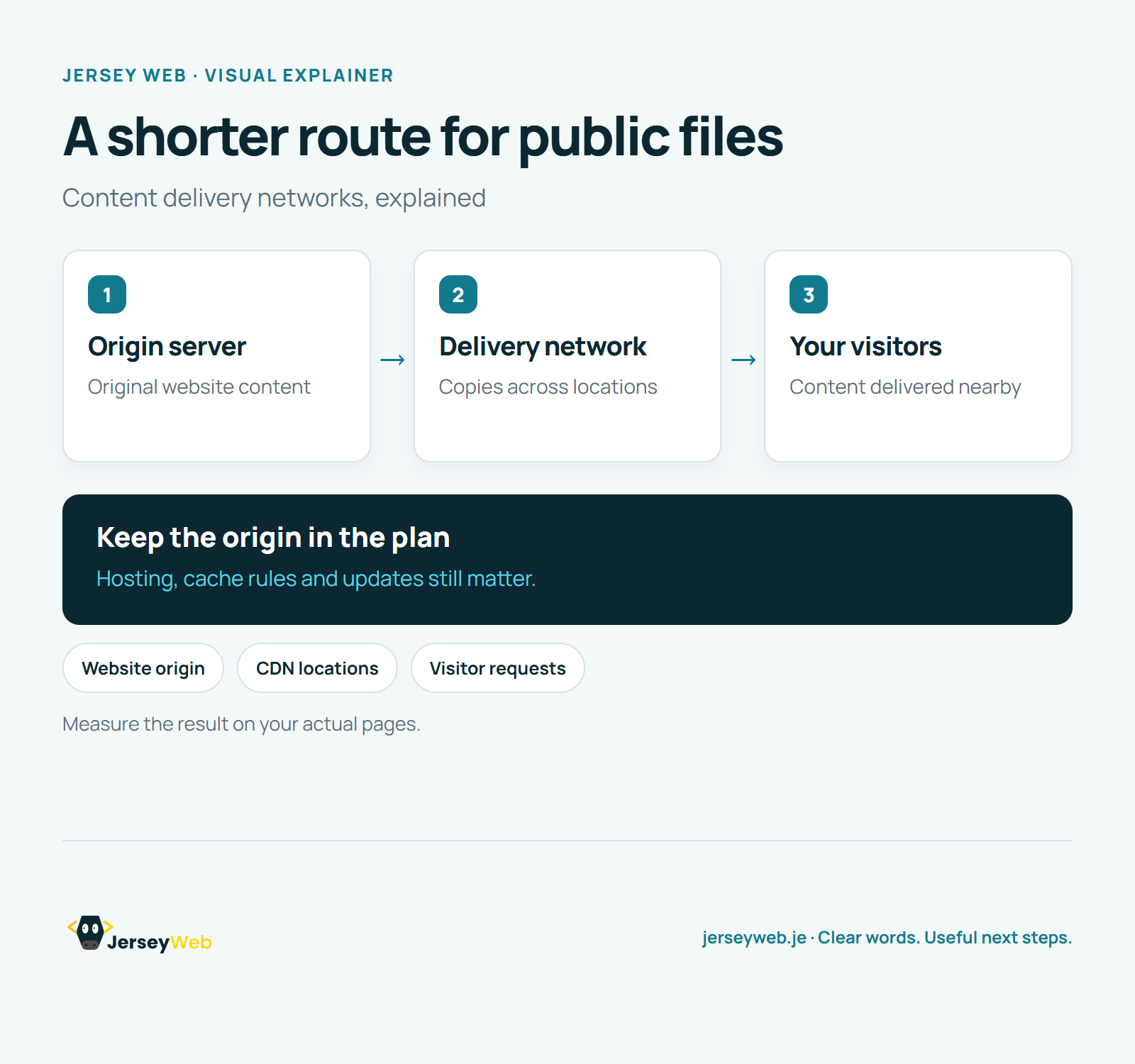
Read the diagram as text
- Origin server: Original website content
- Delivery network: Copies across locations
- Your visitors: Content delivered nearby
Keep the origin in the plan. Hosting, cache rules and updates still matter.
Measure the result on your actual pages.
Diagram by Jersey Web. Open full size · Source and further detail (opens in a new tab)
Common questions
What does a CDN do for a website?
It can bring saved files closer to your visitors. Choose delivery settings that fit your site.
Go further
More video tips
All 205 videos →
JPEG, PNG, WebP or AVIF? Choosing Website Image Formats
Choose for the image.
Responsive Images Explained: Better Photos on Small Screens
Send a suitable image size.