Watch a related explainer
In plain English
HTML stands for HyperText Markup Language. It gives a webpage its structure: this text is a heading, this group is a list, this item is a link, and this control is a form field. A browser interprets that markup and presents the document to the visitor. The markup also supplies information used by other software, including assistive technology.
An everyday analogy is the structure of a printed document. A title, a paragraph and a table have different jobs even if they are all printed in black ink. HTML describes those jobs on the web. Simply making text large does not necessarily give it the meaning of a heading, and making a phrase look like a button does not automatically create a working control.
MDN’s HTML documentation explains the language and its relationship with other web technologies. CSS can control appearance, while JavaScript can add behaviour. The three commonly work together. A website builder or CMS may hide much of the underlying code, but the generated structure still affects the page the visitor receives.
Why it matters for a Jersey business
A Jersey customer may visit a website to find a service area, telephone number, price explanation or enquiry form. Clear structure helps that person locate the relevant information quickly. A sensible sequence of headings is easier to scan than an unbroken block of text, particularly on a phone where the reader sees only a small part of the page at once.
Structure also matters when someone navigates with assistive technology or a keyboard. The W3C’s page structure tutorial explains how meaningful regions and headings support navigation. A visually polished design can still create difficulty if controls or document structure do not describe their actual purpose.
A realistic Jersey example
Imagine a Jersey repair business with separate sections for appliances, service areas and booking. This is an illustrative example. The page has one clear main title, descriptive section headings and ordinary links to detailed information. The enquiry fields have labels, and the action to send an enquiry is a genuine form control.
The business owner edits wording through a CMS. Instead of selecting a heading style because it happens to be the desired size, they choose the heading level that fits the document and let the design system control its appearance. This keeps the page’s meaning stable as new sections are added.
What to check on your website
Start with the content outline. Can someone understand the page from its headings, and do those headings introduce the material beneath them? Keep the main topic clear and use lists or tables when their structure genuinely helps. Avoid arranging a page solely through repeated spaces, empty paragraphs or visual tricks that an editor may accidentally break.
Check the links and controls. A link takes a visitor to a destination; a button usually performs an action. Descriptive wording helps people understand the next step. Google’s link guidance also explains the importance of proper crawlable links. Text that merely resembles a link is not a substitute for a usable destination.
Ask for a check of form labels, image alternatives and the page’s reading order. These checks should follow what a customer is trying to do, rather than simply proving that the page contains particular tags. A useful contact form tells people what to enter, which fields are required and what happens after submission.
If your editor offers both content and code views, agree which tasks staff should perform. Record any custom components that need specialist maintenance. The owner should be able to change ordinary business information without accidentally changing important structure or controls.
Common myths
HTML only affects how a page looks. It also describes the purpose and structure of content.
A builder removes the need for markup quality. The builder still produces a document that browsers and other software interpret.
More headings always improve a page. Headings need to represent a coherent outline, rather than decorate every sentence.
Our take
Jersey Web’s view is that good structure makes a website easier to use and maintain. Owners do not need to memorise HTML syntax, but understanding headings, links and labelled controls helps them keep a clear page clear as the business grows.
See it in a diagram
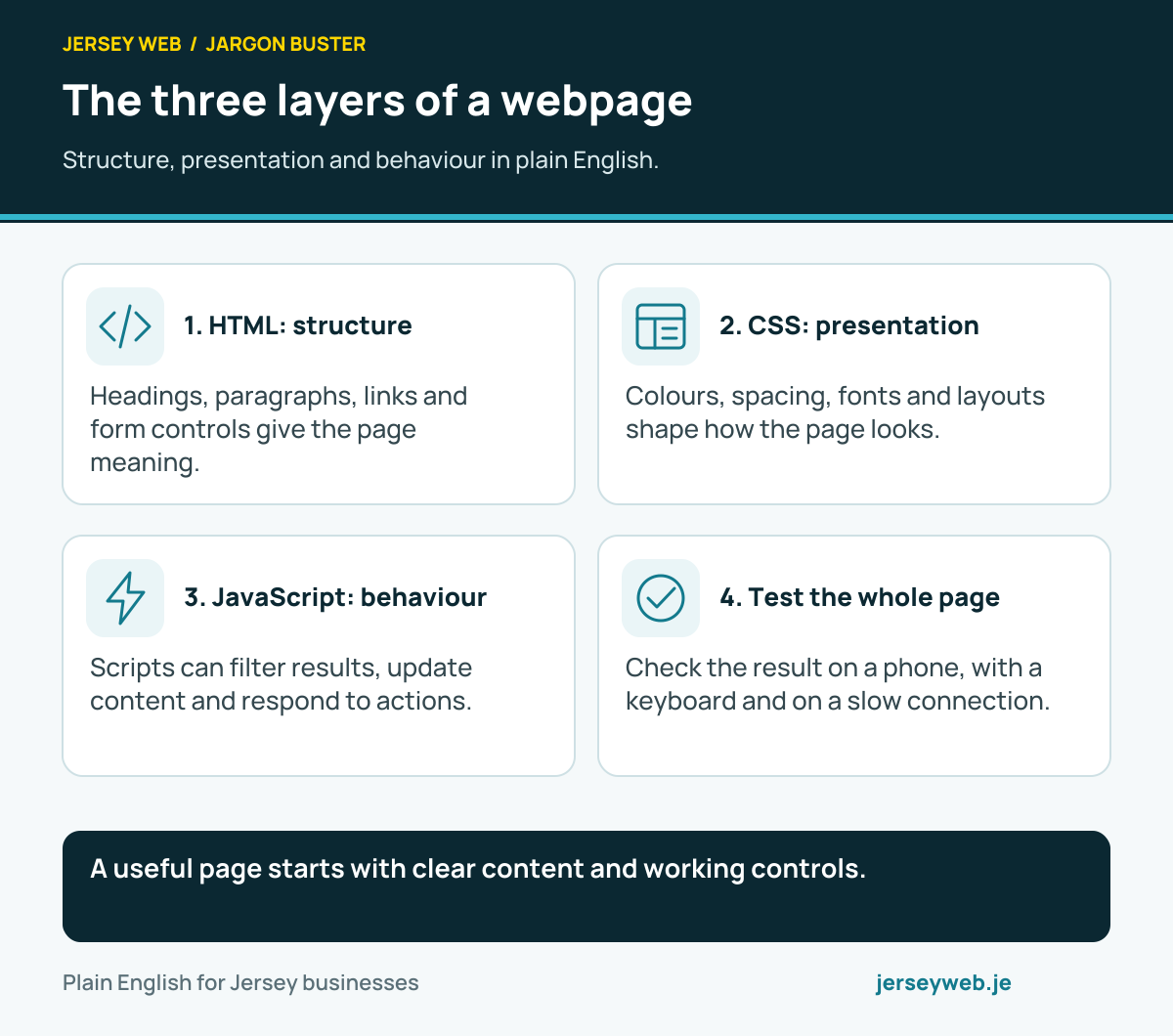
A useful page starts with clear content and working controls.
Read the diagram in text
- HTML: structure. Headings, paragraphs, links and form controls give the page meaning.
- CSS: presentation. Colours, spacing, fonts and layouts shape how the page looks.
- JavaScript: behaviour. Scripts can filter results, update content and respond to actions.
- Test the whole page. Check the result on a phone, with a keyboard and on a slow connection.
Related terms
Learn more
Common questions
- Is HTML a programming language?
- HTML is a markup language used to describe content and structure. It is different from a programming language that expresses instructions and logic, although it works alongside those technologies in a website.
- Do I need to learn HTML to edit a site?
- Many content management systems provide editing controls that generate HTML for you. You still benefit from understanding headings, links and image descriptions, even if you never edit the underlying code.
- Can good HTML guarantee a Google ranking?
- No. Clear, accessible content and crawlable links help a page work properly, but search visibility depends on many factors and indexing or rankings are not guaranteed.
- What does semantic HTML mean?
- Semantic HTML uses elements according to their meaning, such as a heading for a section title and a button for an action. It helps software and people understand the page’s structure.
Written by Jersey Web. Last reviewed 3 October 2026. Back to the Jargon Buster.