Website Usability Testing: Learn by Watching People Attempt Real Tasks
How can you find out where visitors struggle? Watch suitable participants attempt realistic tasks on the website or prototype.
1:47 · No narration: the video shows each step as text on screen, and every step is written out below, with buttons that jump the video to it.
Prefer YouTube? Watch this video on our YouTube channel (opens in a new tab).
The six points in the video
This is a silent video. The headings, explanations and labels below reproduce the information on screen.
-
Step 1: Choose a useful question
Decide which part of the journey needs evidence.
On-screen labels: Research question; Important task; Uncertain design.
-
Step 2: Find relevant participants
Invite people whose needs and circumstances relate to the service.
On-screen labels: Relevant needs; Different circumstances; Suitable participants.
-
Step 3: Set a realistic task
Describe a goal without telling the person exactly which button to use.
On-screen labels: Meaningful scenario; Clear goal; Room to choose a route.
-
Step 4: Observe without steering
Notice what they do and use neutral prompts to understand their thinking.
On-screen labels: Observed actions; Neutral questions; Points of hesitation.
-
Step 5: Record the difficulty
Capture the task, the problem and its effect on progress.
On-screen labels: What happened; Effect on the task; Supporting evidence.
-
Step 6: Improve and retest
Prioritise important problems and check whether the changes help.
On-screen labels: Priority issue; Practical change; Follow-up observation.
A practical check for your business
Ask a suitable participant to attempt a realistic task without telling them the route. Record what happens and which problems affect completion, then review a practical improvement.
Sources and further detail
See it in a diagram
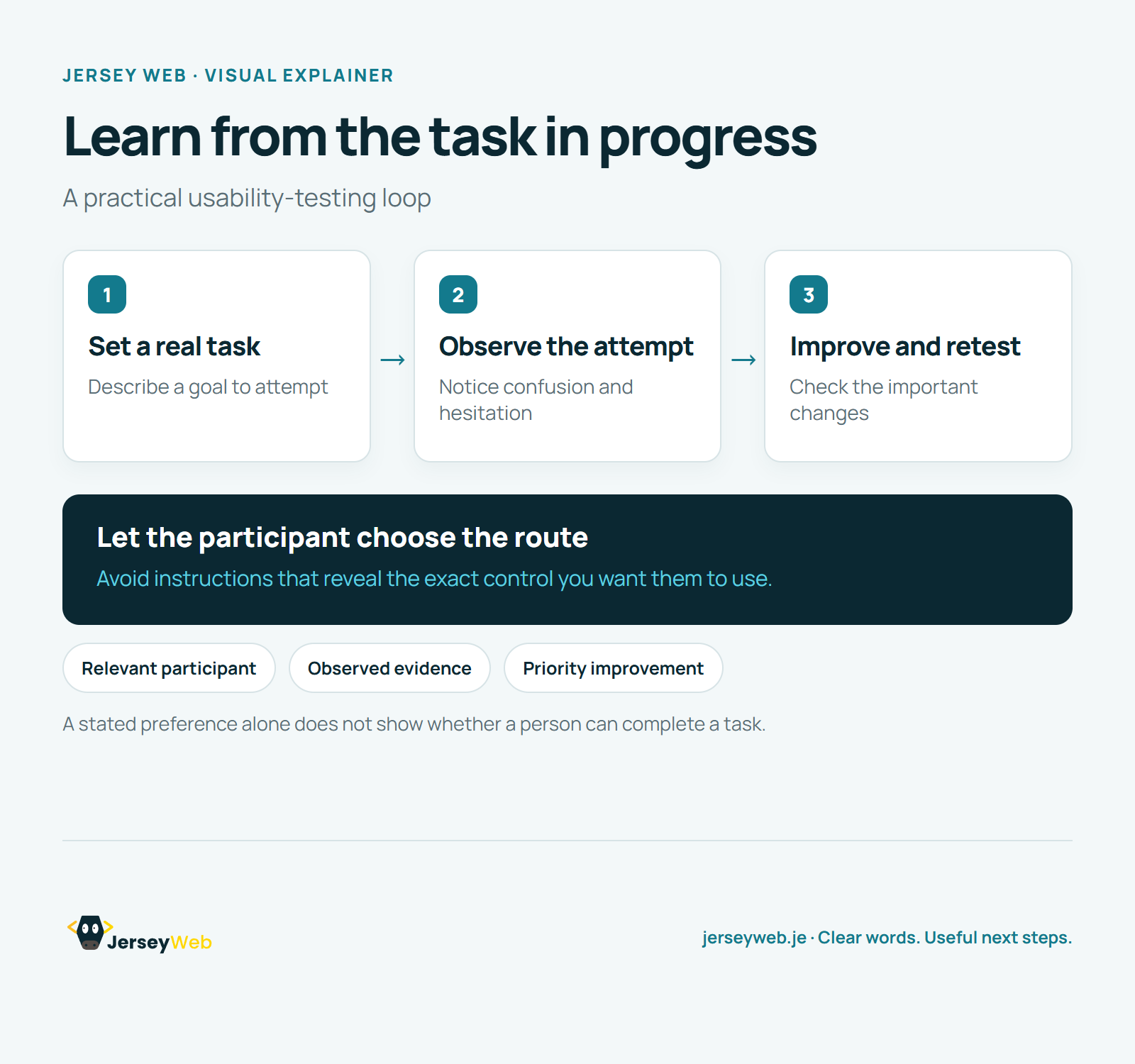
Read the diagram as text
- Set a real task: Describe a goal to attempt
- Observe the attempt: Notice confusion and hesitation
- Improve and retest: Check the important changes
Let the participant choose the route. Avoid instructions that reveal the exact control you want them to use.
A stated preference alone does not show whether a person can complete a task.
Diagram by Jersey Web. Open full size · Source and further detail (opens in a new tab)
Common questions
How can you find out where visitors struggle?
Watch suitable participants attempt realistic tasks on the website or prototype. Turn the findings into changes and test the important fixes.
Go further
More video tips
All 205 videos →
Information Architecture Explained: Organise Website Content Around Real Needs
Information architecture, explained.
Website Content Audit: Decide What to Keep, Improve or Remove
A practical content-audit checklist.