Watch a related explainer
In plain English
Alt text provides a text alternative for an image. On a website it is commonly supplied through the HTML image element’s alt attribute. People using screen readers may hear that alternative as part of understanding the page. Its usefulness depends on what the image contributes to the surrounding content or action.
W3C’s image accessibility tutorial distinguishes informative, decorative, functional and complex images. Those distinctions help an editor decide what information a visitor needs. A photograph showing a product detail has a different purpose from a decorative background or an image used as the only content of a link.
The right question is therefore what the visitor would lose without the image. Sometimes a short description supplies the missing information. Sometimes nearby text already explains it and the image is decorative. A diagram with several relationships can need a complete text explanation in addition to a concise image alternative.
Why it matters for a Jersey business
Images often carry important business information: a product variation, a venue entrance or a step in a process. An editor should identify that information before writing the alternative. Describing only colours and shapes can miss the point, while adding an unrelated business name or keyword list can obscure useful content.
Image controls also need understandable purposes. If an image acts as a button or link, visitors need to know what activating it does. The maintainer should review its accessible name in the actual page, including any nearby link text, rather than assume the uploaded filename supplies an appropriate description.
A realistic Jersey example
Imagine a Jersey shop publishing a photograph to explain where customers collect an order. This is a hypothetical example. The photograph shows the relevant entrance beside a recognisable sign. A useful description conveys the identifying information, while nearby text supplies the address and any collection instructions that everyone needs.
On another page, the same photograph might simply decorate an introduction already containing those instructions. Its role has changed, so its alternative may change too. The editor reviews each placement instead of treating one description in the media library as the final answer for every use of that file.
How to review image alternatives
Identify the image’s role. Ask whether it communicates information, performs a function, conveys a complex relationship or adds decoration. W3C’s alt decision tree provides a structured way to consider these cases. Use the actual page context rather than classify images by their file type.
Describe the relevant information. For an informative image, communicate what matters to understanding the content. Avoid repeating a surrounding paragraph unnecessarily. The shop’s collection photograph needs the useful entrance detail; a product photograph may need an important visible difference between options. The wording should reflect the evidence in that image.
Handle decorative images deliberately. An empty alt attribute is different from omitting the attribute. A decorative image should not introduce unhelpful announcements into the reading experience. Ask the developer how the template handles empty alternatives, especially where a content-management interface tries to require text for every uploaded image.
Check image links and buttons. Review the action’s accessible name and destination. If visible text already provides the name, the accompanying image may not need to repeat it. If the image is the only content, its alternative must make the purpose understandable. Test the complete control rather than reviewing the image field alone.
Explain complex content in text. A chart, map or process diagram can contain more information than a short alternative should carry. Provide a usable explanation of the important values or relationships on the page. Our glossary infographics include concise alternatives and full text equivalents so their guidance remains available without reading the graphic.
Review rendered pages after editing. Confirm that the intended alternative reaches the actual image, and check relevant screen-reader behaviour as part of accessibility review. A media-library entry can be overridden or ignored by a component. Inspect the places where the image appears, including relevant mobile layouts and linked uses.
Common myths
Every image needs a detailed visual inventory. Describe its relevant purpose and information.
An empty alternative is always an error. It is appropriate for many decorative images.
Keywords make a useful alternative automatically. Accurate, contextual wording comes first.
Our take
Jersey Web treats image alternatives as part of editing the page. Decide what each image contributes, provide the information or action people need and verify the rendered result. That produces more useful content than filling an upload field without reviewing where the image appears.
A real Jersey example
Alt text for a real Jersey photograph
Here the photograph illustrates the lighthouse and its coastal setting. The description below names what is visible. If the same image were purely decorative beside text that already supplies all its information, an empty alt attribute could be appropriate instead.

The alternative used here
alt="La Corbière Lighthouse stands on dark rocks against blue-grey water beneath a pink and peach evening sky."
Describe the information the image contributes in its actual context. An unrelated list of business keywords would make this alternative less useful.
Browse the original Jersey photo library → · Check photo usage terms
See it in a diagram
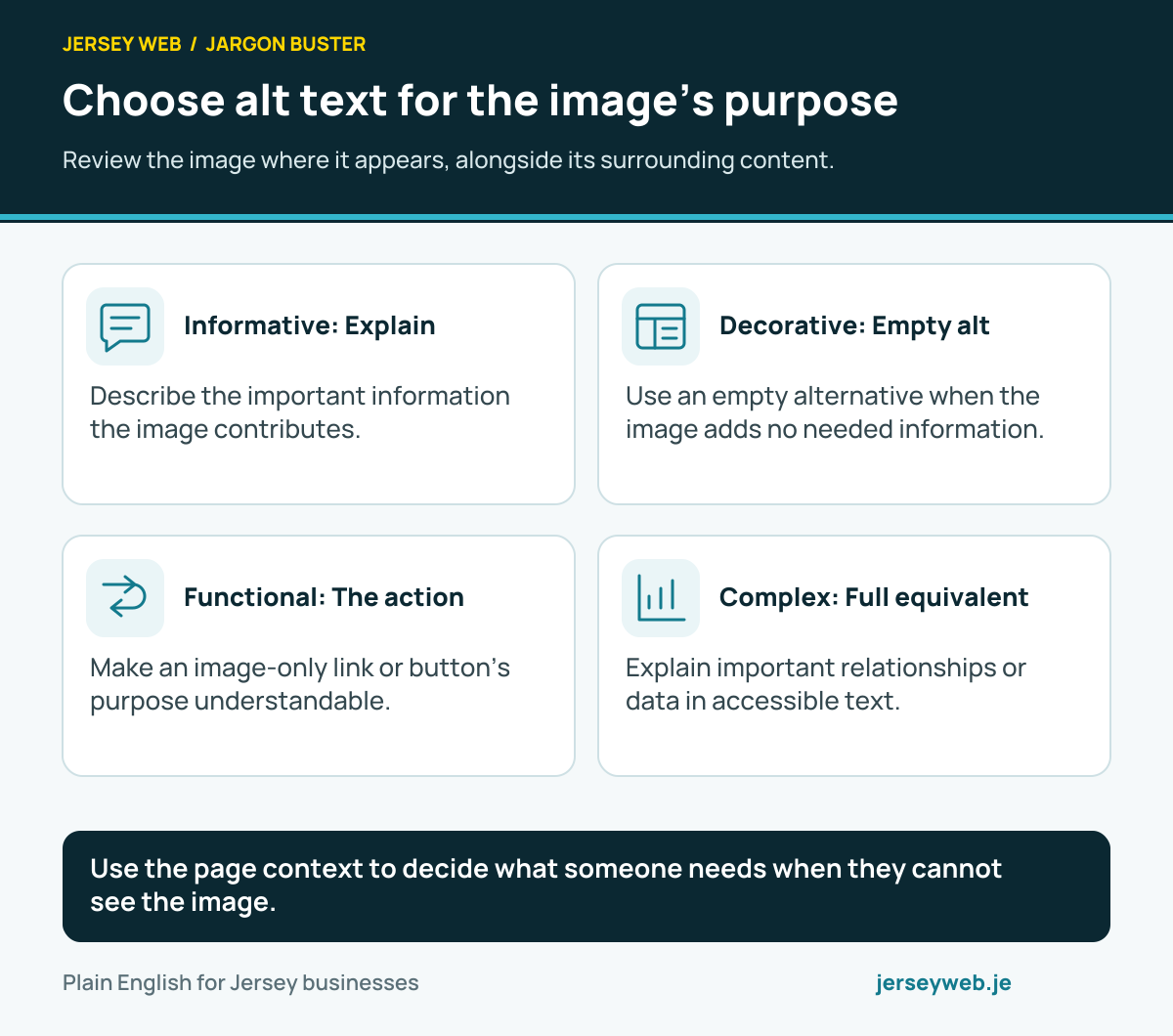
Use the page context to decide what someone needs when they cannot see the image.
Read the diagram in text
- Informative: Explain. Describe the important information the image contributes.
- Decorative: Empty alt. Use an empty alternative when the image adds no needed information.
- Functional: The action. Make an image-only link or button’s purpose understandable.
- Complex: Full equivalent. Explain important relationships or data in accessible text.
Diagram sources
Related terms
Learn more
Common questions
- Does every image need a long description?
- No. Choose an alternative for the image’s purpose. Decorative images commonly use an empty alt attribute, while a complex diagram can need a fuller explanation elsewhere on the page.
- Should alt text contain the business’s keywords?
- Describe the relevant information or function accurately. Adding unrelated search phrases makes the alternative less useful. The description should serve the image’s purpose in its actual context.
- What should an image link’s alternative say?
- Explain the link’s purpose when the image supplies its accessible name. For example, the alternative for an image-only home link should identify that destination rather than describe every visual detail of the logo.
- Does adding alt text make a website accessible?
- It addresses one aspect of accessibility. Navigation, structure, forms, contrast and other behaviour still need appropriate review. A completed image field is not evidence that the whole page works for everyone.
Written by Jersey Web. Last reviewed 12 October 2026. Back to the Jargon Buster.