Watch a related explainer
In plain English
Indexing is the search engine’s processing of content for potential use in search results. It analyses a page and may store information about it in its index. The page being online or successfully fetched is useful evidence about access, but it does not establish that the indexing stage has included it.
Google’s overview of Search distinguishes crawling, indexing and serving results. It states that indexing is not guaranteed. A business owner should therefore identify the stage being investigated instead of treating every absence from a particular search as a technical failure to publish the page.
The practical review includes the content, response, indexing instructions and canonical signals. These should reflect the page’s intended public role. Search tools can then provide evidence about what the engine has processed, with a clear distinction between its stored information and a live test of the current page.
Why it matters for a Jersey business
New service information and helpful guides should have a clear place within the public website. The business needs to check that release settings do not unintentionally prevent intended search inclusion. A noindex instruction used for a test environment deserves review before the content becomes public.
Duplicate routes can also make the investigation confusing. The owner may inspect one address while the search engine selects another representative version. Consistent internal links, sitemap entries and appropriate canonical signals help express the site’s intended arrangement, although the engine still makes its own processing decisions.
A realistic Jersey example
Imagine a Jersey photography business moving an existing service explanation to a new website. This is a hypothetical example. The team checks the new public address, its response and indexing instructions, then reviews the relevant canonical and any old-address redirect. It preserves a useful route for customers.
The owner reviews the URL through Search Console and records the reported status alongside the release date. If the report reflects an older crawl, the team distinguishes that history from the current live configuration. The example does not promise immediate inclusion or a specific position for a photography search.
How to investigate indexing
Name the intended URL. Check the exact address, including whether it redirects and which page ultimately appears. A route with different parameters or an alternative hostname may not be the intended canonical page. Keep the investigation tied to the resource the business actually wants customers to use.
Review indexing instructions. Inspect the delivered page and relevant headers through suitable tools. Google’s noindex guidance explains supported instructions and the need for the crawler to access them. A robots.txt block is not an interchangeable way to communicate the same indexing decision.
Check canonical signals. Google’s canonical documentation explains methods for indicating a preferred version of duplicate content. Keep the website’s links and sitemap aligned with the intended address. Avoid sending contradictory signals or assuming that a canonical tag is a command guaranteeing the engine’s choice.
Inspect the content. Confirm that the public page contains the useful explanation expected by the business and is not an empty shell or accidental duplicate. Review the rendered material where scripts supply meaningful content. Appropriate technical access supports processing, while a useful page still needs clear information serving its reader’s task.
Read the tool’s evidence carefully. Google’s URL Inspection documentation describes its information and live inspection capabilities. Distinguish the recorded index information from current tests. Note the relevant date, reported canonical and status instead of reducing the investigation to a single reassuring indicator.
Correct a specific issue. If an unintended instruction or faulty route is found, fix it through the site’s supported release process and recheck the delivered result. Use appropriate search-engine requests when warranted. Repeated requests cannot substitute for resolving the actual configuration or content problem.
Review without guarantees. Keep the owner informed about verified changes and subsequent reported processing. Index inclusion does not establish a high position for every target query, and one search result view is not a complete diagnosis. Use the evidence appropriate to the question and keep predictions separate from confirmed observations.
Common myths
A live page is automatically indexed. Availability and inclusion are separate.
A canonical tag guarantees the selected version. It is part of the signals the engine considers.
Indexing proves strong rankings. Inclusion and results for a particular query differ.
Our take
Jersey Web’s view is to inspect the intended page and its signals, then read the search tool’s evidence in context. Resolve concrete problems and record verified changes. The business should understand what is currently configured, what the engine reports and which outcomes remain outside its control.
See it in a diagram
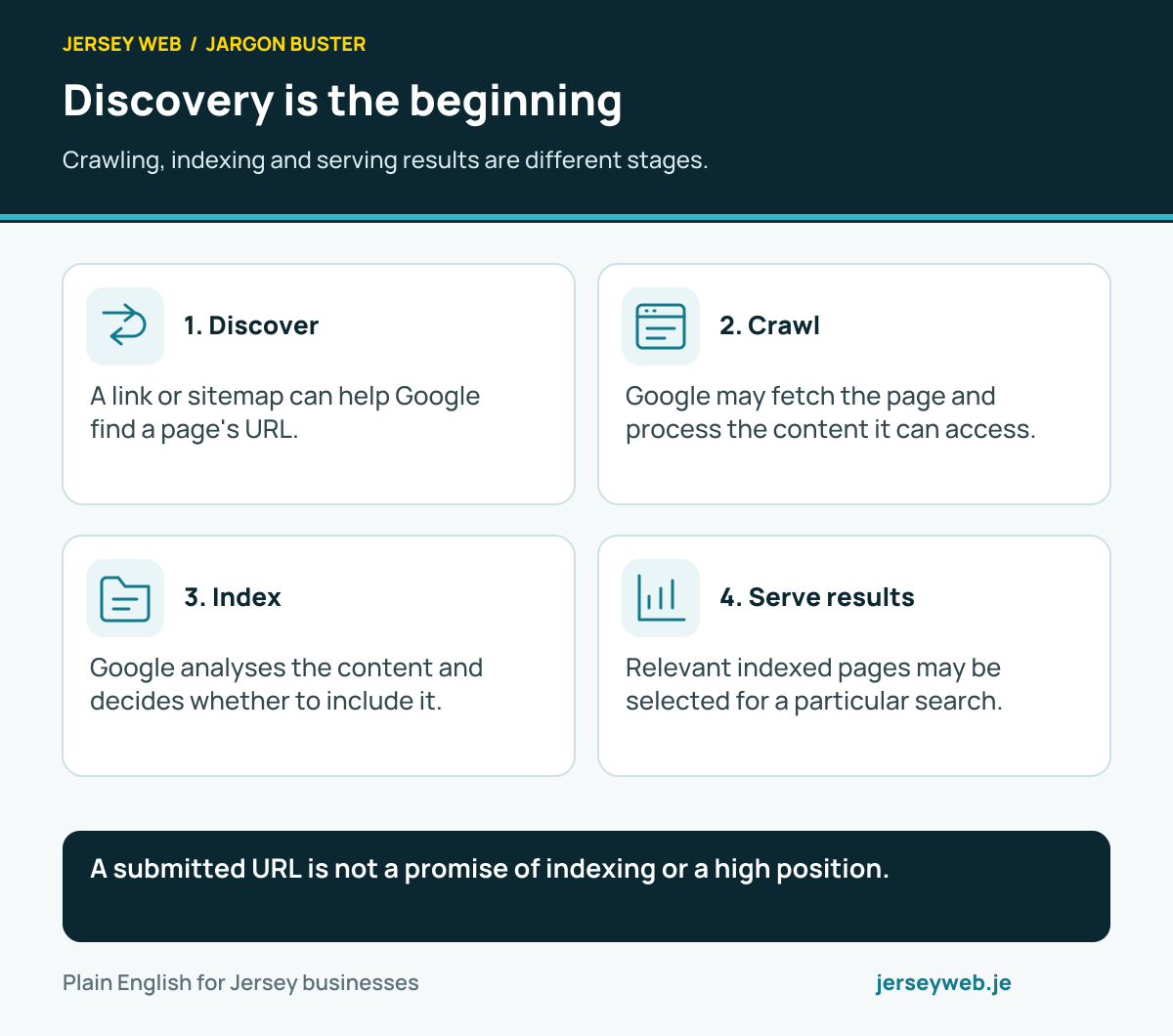
A submitted URL is not a promise of indexing or a high position.
Read the diagram in text
- Discover. A link or sitemap can help Google find a page's URL.
- Crawl. Google may fetch the page and process the content it can access.
- Index. Google analyses the content and decides whether to include it.
- Serve results. Relevant indexed pages may be selected for a particular search.
Related terms
Learn more
Common questions
- Is a live page necessarily indexed?
- No. Being publicly available is different from being included in a search engine’s index. Investigate the reported status for the actual URL.
- Does indexing guarantee a high search position?
- No. Inclusion and serving a result for a particular query are separate questions. A page may be indexed without appearing prominently for the searches the owner expects.
- Can robots.txt and noindex be used interchangeably?
- No. Crawl rules and indexing instructions serve different purposes. Google needs access to read a noindex instruction, so a crawl restriction can prevent it seeing that instruction.
- Should every duplicate address have its own indexed page?
- Not necessarily. Review appropriate canonical signals and a useful URL arrangement. The aim is clear, relevant pages rather than several competing versions of the same content.
Written by Jersey Web. Last reviewed 3 October 2026. Back to the Jargon Buster.